

While smartphones have given us the ability to be available 24/7, there are times when we prefer not to be reached. In the past, shutting off our phones was the only solution; however, that's hardly socially acceptable today. After all, if your notifications are turned off, you may miss an important message.
While smartphones have given us the ability to be available 24/7, there are times when we prefer not to be reached. In the past, shutting off our phones was the only solution; however, that’s hardly socially acceptable today. After all, if your notifications are turned off, you may miss an important message.
There are more effective ways to avoid distractions than simply enabling Do Not Disturb (DnD) mode or setting up auto-reply messages. One such solution is sharing your Focus Status on iOS devices. Let’s see what sharing your Focus Status means, and how you can actually do it.
What Does Focus Mode on iOS Mean?
Focus Mode was initially rolled out for iOS devices on September 20, 2021. It helps users stay concentrated by shutting off notifications that could be stressful or disruptive. Whether people are trying to get work done distraction-free or driving and don’t want any unnecessary interruptions, Focus Mode can come in handy in those moments.
There are a few standard Focus Modes to pick from, including Sleep, Work, Personal, and the always useful Do Not Disturb. Or you can create your own unique Focus Mode.
Focus mode is entirely based on user preference, meaning that the customer gets to choose which apps and contacts can send notifications during block-off periods of time. For transparency, any time-sensitive or emergency notifications, plus calls from significant people, will still be allowed to come through. Focus Modes can be predetermined and even scheduled ahead of time; in addition, they’re shareable between iOS devices.
What is Share Focus Status on iPhone?
Sharing your Focus Status on iPhone is beneficial because it lets your contacts know why you can’t reply to them. Without sharing, people might think you’re ignoring them or worse, and that could lead to communication problems.
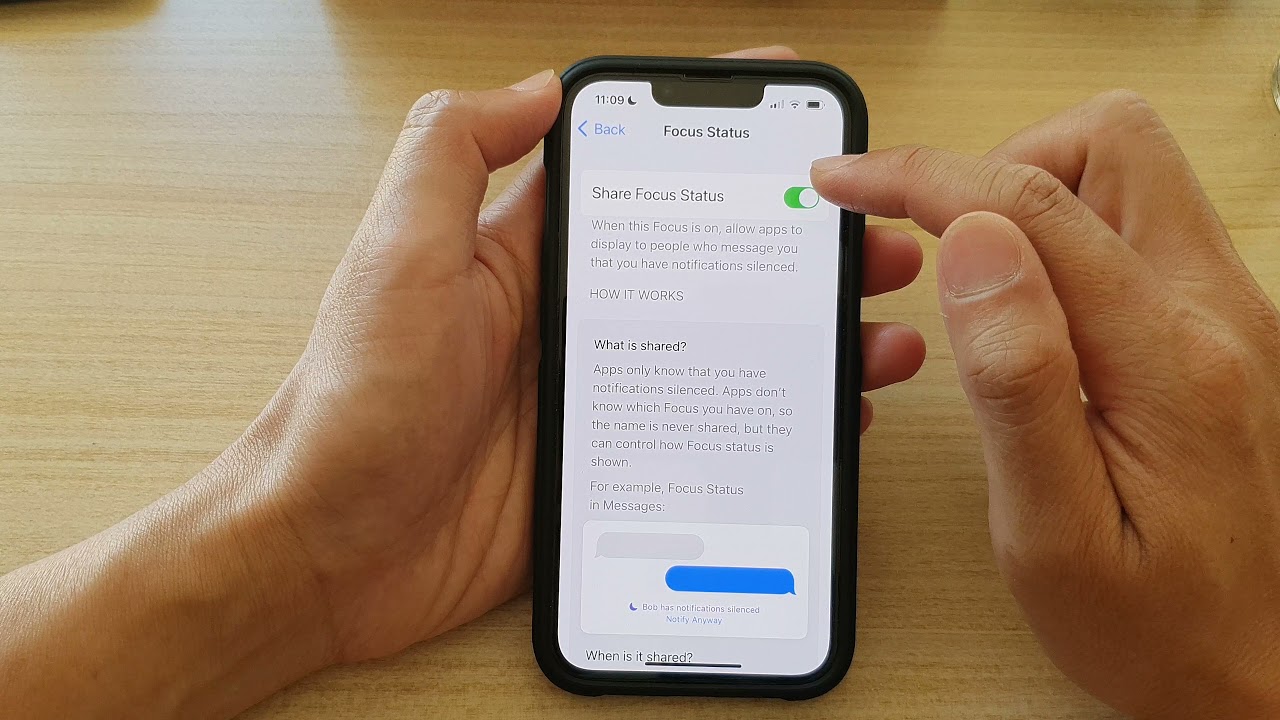
When you have Share Focus Status activated, your contacts will be notified that you are unavailable to answer their messages. If someone attempts to message you, they’ll receive a note informing them of this and giving them the option to wait for you or notify you of an emergency.
Why Sharing Focus Status is Considered Important?
If you keep your notifications off without warning the other person, it might cause problems with communication. So that nobody gets upset, share your Focus Status with whoever you’re talking to. They’ll know that if you don’t respond right away, it’s not because you’re being rude; you just can’t answer at the moment.
By sharing your focus status and using the Focus Mode, you can stay healthy by focusing or relaxing without being disturbed by unimportant notifications. With Share Focus Status’s help, you can put some distance between yourself and your phone while still maintaining strong relationships.
How can you share your Focus Status?
You can share your Focus Status in a few simple and easy steps. Let’s take a look at them.
- Open Settings and locate the Focus option with a moon symbol
- Select the Focus Mode of your choice (work, sleep, etc.)
- Look for Focus Status just below the options
- Tap on Focus Mode in order to turn the feature on
- Go through the steps again to ensure all the different Focus Modes are on that you want to share with your contacts.
How to Turn Off Share Focus Status
You can turn off the Share Focus Status in a few simple and easy steps. Let’s take a look at them.
- Go to Settings and select Focus
- Tap on your choice of Focus Mode you want to stop sharing
- Tap on Focus Status from under the options and toggle the switch
- Repeat the same for the Focus Mode you want to stop sharing
Conclusion
It is easy to let our phones control us with their constant notifications, but ignoring the world without warning your contacts first can be impolite. By sharing your Focus Status, you get the best of both worlds. You are in control of who gets access to your time and attention by turning this feature on for specific people and customizing your Focus settings according to what works best for you.
Related: What is Shop Pay? One Payment Service for All Your Purchases
Related: What Does AS Mean on TikTok? Explaining the Adult Swim Trend
Frequently Asked Questions
What Does Focus Mode on iOS Mean?
Focus Mode was initially rolled out for iOS devices on September 20, 2021. It helps users stay concentrated by shutting off notifications that could be stressful or disruptive. Whether people are trying to get work done distraction-free or driving and don't want any unnecessary interruptions, Focus Mode can come in handy in those moments.
What is Share Focus Status on iPhone?
Sharing your Focus Status on iPhone is beneficial because it lets your contacts know why you can't reply to them. Without sharing, people might think you're ignoring them or worse, and that could lead to communication problems.
Why Sharing Focus Status is Considered Important?
If you keep your notifications off without warning the other person, it might cause problems with communication. So that nobody gets upset, share your Focus Status with whoever you're talking to. They'll know that if you don't respond right away, it's not because you're being rude; you just can't answer at the moment.
How can you share your Focus Status?
You can share your Focus Status in a few simple and easy steps. Let’s take a look at them.
How to Turn Off Share Focus Status
You can turn off the Share Focus Status in a few simple and easy steps. Let’s take a look at them.
Last updated on


